The Perfect Frame
“Wayland is a replacement for the X11 window system protocol and architecture with the aim to be easier to develop, extend, and maintain.”
This is generally a true sentiment, but it does not mean that a Wayland based compositor is easy to develop by a long shot. A feature most modern desktop users take for granted are perfect frames. This is a general term for the most part, but encompases several smaller features, which all need to be organized together. What do I mean by this?
First, we need to understand the abstract approach to how Wayland “compositors” operate.
Wayland Compositors
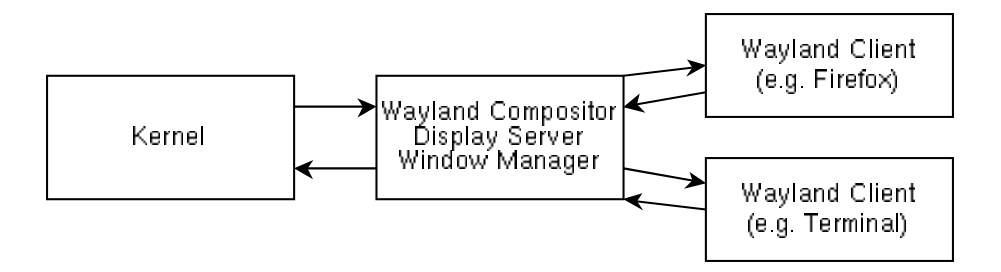
The diagram above shows the separation of powers in the average Wayland-based, graphical desktop stack. We wan’t to focus on how the “compositor” interacts with the clients. The “compositor”, in this case, is actually the display server, window manager, and wayland compositor, but for simplicity, we call this program the “compositor”. It is responsible for orchestrating the connected clients, or windows. The way Wayland operates, clients are given almost no liberties, with the exception of a graphics buffer they can fill however they like. Under this format, a client cannot reposition, resize, go fullscreen or hide itself, among many others. If a client wishes to do or modify nearly anything, it must request that the compositor do it for them. Not only does the compositor do a lot of heavy lifting, but it also has the final say whether anything will get done or not.
Client Configures
Nothing seems too complex yet, and under the currently described procedure, getting perfect frames to appear should be easy. Don’t forget, the compositor decides everything about all clients, except the contents of their buffers. This means that, if the compositor tiles a client to a new size, the client needs to react by changing the contents of its buffer to make sense at the new size. If the compositor doesn’t tell the client about size changes, the compositor must instead either crop parts of the buffer, or introduce visual artifacts for padding. This is, of course, horrible if the goal is to achieve true perfect frames.
Luckily, the Wayland ecosystem has “client configures”, which are used to communicate relevant changes to clients, so they can react accordingly. Most notably this includes telling clients their dimensions and their fullscreen status. In a moment, you will understand why these two alone require dominion over many more facets of the client state, but first, what does a configure look like?
Below is the signature of the function used to resize clients in wlroots.
uint32_t wlr_xdg_toplevel_set_size(
    struct wlr_xdg_toplevel *toplevel,
    int32_t width,
    int32_t height
);
The return value here is called the configure serial. When
we make a call to wlr_xdg_toplevel_set_size, we immediately
resize the client’s buffer in the compositor, while also sending a
message to the client about this new size. The client needs time to
react to this new size, and will later call the compositor with a
configure_ack. It will pass this same serial to the
configure_ack to notify the compositor that the client has
handled the new size and is ready to be rendered.
The compositor never stopped rendering the client, and resized it immediately before telling it about the new size. Oh no. That must mean… there must have been… IMPERFECT FRAMES!!!
Orchestration and Synchronization
Ok ok ok, calm down. We can fix this. We just need to make a copy of the client’s buffer before configuring it to resize. Then we can hide the real client’s buffer while its resizing, and show the copy in its place. Once the client is ready, we swap its real and copy buffers, and everything is good! Welllll, not quite. One thing we forgot to consider is that some clients may handle their configures faster than others, and it’s possible some might not handle them at all. In the case of the former, this is especially noticeable with tiling window managers, where the size and position of clients are often dependent on each other. With this kind of synchronization, resizing windows in a tiling layout would be a disastrous cascade of windows finally catching up with their proper, true to size buffers.
Instead of waiting for clients to resize individually before revealing, we should wait for all clients to handle configures before revealing all of them at once! That works too, but it also requires us to make all of the configures at the same time, so that we can make all the copy buffers at the same time as well. How can we make sure that all of these configures happen simultaneously?
State, state, state and more state
Things are getting quite out of hand. To synchronize the changing of client state, we should instead collect all the state changes that want to be made to clients and mark them as “pending”. Once all the desired changes are queued, we apply all the new states at once, with a bit of nuance. First, we don’t need to tell clients about requested state changes if they aren’t changes at all. So we will check the client’s current state, take size for example, and if the proposed new size is the same, don’t even bother telling the client about the new size we want it to be. Second, if the state of the client we want to change doesn’t require the client to know, wait till later in order to set that state. Notably, this includes the client position. But why doesn’t the client need to know its position?
The client’s only job is to change the contents of its buffer. It’s important for it to know its size, so that the contents can reflect that, but the position of the client doesn’t change the contents of the buffer at all. A client will render the same at the top left of the screen compared to the bottom right. Therefore, changes to a clients position can be done instantaneously on the compositor end, since no configure needs to be made. But if there is a change in position at the same time as a change in size, the geometry of our windows is unsynchronized again, and the perfection of tiling window managers will suffer.
Pending and Sending
To circumvent this, we split our state synchronization into two steps: apply pending, and apply sending. We already spoke about apply pending, when all the configure reliant client state changes are made at once. These types of state changes are all now marked as “sending”. This indicates to the compositor that we have told the client about these state change requests, and that we are waiting for them all to acknowledge the configures. Once all the clients acknowledge the configures, we move onto apply sending. This is where instantaneous changes can be made, such as position of clients and changing their borders. Keep in mind that when we apply pending changes, we must make copies of all the clients to show while we wait for their buffers to catch up. This means in application sending, we should delete the copies and reveal the true client buffers as well.
The Loop
There are a couple more bits a pieces to this, like when manipulating the scene graph or creating new clients, but this is the general form and has been working very well in Mezzaluna so far. To recap, here are the high level steps:
- Accumulate all requested state changes as “pending” state
- Make a copy of all the client buffers, hide the clients, and show the copies
- Apply pending changes to all clients at once, only making the configure reliant changes (resize, fullscreen, etc.)
- Wait for all clients to acknowledge all of their configures
- Apply all the sending changes, only making the configure independant changes (position, enabled/disabled, etc.)
- Show the true client buffers and delete the old buffer copies
- Repeat
If you have any questions at all, I’d be happy to respond at hdiambrosio@gmail.com. The implementation for Mezzaluna was heavily based on IFreund’s approach with river (now river-classic).